
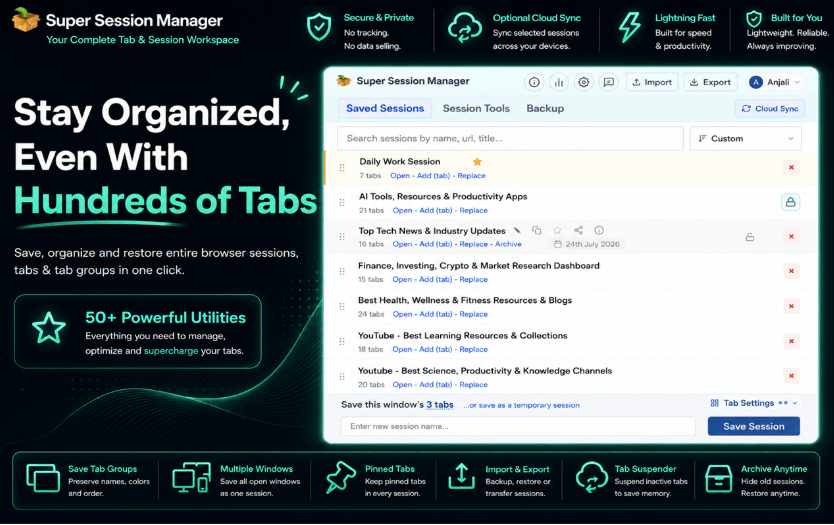
Behind those open tabs are usually entire projects: documentation pages, GitHub repositories, API references, testing environments, dashboards, design files, error logs, and dozens of resources needed to solve problems faster.
The challenge is that these tabs are not random. Each one belongs to a specific task, project, or idea.
A front-end developer may have React documentation, component libraries, browser testing tools, and design resources open at the same time.
A backend developer might be switching between API documentation, database references, cloud dashboards, and monitoring tools.
The problem appears when everything starts mixing together.
A browser window with 100 open tabs is not just clutter. It represents different workspaces that developers depend on every day.
This is where a modern tab manager becomes useful.
Instead of forcing developers to close important resources or search through endless browser history, a smart session management solution helps organize, save, and restore complete workflows.
One tool designed for this purpose is Super Session Manager, which helps developers manage complex browser environments without losing their productivity.
The Hidden Problem Behind Too Many Developer Tabs.
Most developers understand the value of keeping useful resources available.
A documentation page that solved an issue yesterday might be needed again tomorrow. A GitHub issue, Stack Overflow answer, or API reference can become an important part of a development workflow.
The problem is not having many tabs.
The problem is losing control over them.
Common situations developers face include:
- Searching through dozens of similar tabs
- Accidentally closing important research pages
- Reopening project resources manually
- Keeping duplicate documentation tabs open
- Losing work after browser crashes
- Mixing different projects in the same browser window
Traditional browser tab manager help store websites permanently, but they are not designed for temporary working environments.
Developers need a way to save the complete context of their work.
Why Bookmarks Are Not Enough for Development Workflows.
Bookmarks are useful for websites that developers regularly visit.
For example:
- A favorite documentation website
- A commonly used development tool
- A company portal
However, development work is usually project-based.
A single project may require:
- Official documentation
- GitHub repositories
- Testing tools
- Design references
- Deployment dashboards
- Research articles
Saving every individual page as a bookmark quickly creates another organization problem.
A better approach is saving the complete workspace.
This is where session management becomes more practical.
A saved browser session keeps related resources together, allowing developers to return to a specific project without rebuilding their environment manually.
A Smarter Way to Manage Development Workspaces.
Super Session Manager works differently from a basic tab organizer.
Instead of only showing open tabs, it allows users to save complete browser sessions and restore them whenever needed.
Developers can create separate sessions for different projects.
For example:
Frontend Development Session
Could include:
- Framework documentation
- UI libraries
- Design references
- Testing tools
- Browser debugging resources
Backend Development Session
Could include:
- API documentation
- Database tools
- Server dashboards
- Cloud services
- Monitoring platforms
Research Session
Could include:
- Technical articles
- Tutorials
- Code examples
- Learning resources
This approach allows developers to switch between different tasks without losing their previous setup.
Restore Tabs Without Rebuilding Your Environment.
One of the biggest chrome extensions for productivity problems is losing a carefully prepared browser workspace.
A developer may spend hours collecting resources for a project. If the browser closes unexpectedly, reopening everything manually wastes valuable time.
A reliable session manager makes it easier to restore tabs and continue from where the work stopped.
Super Session Manager allows users to save and restore browsing sessions quickly.
This is especially useful when:
- Switching between projects
- Restarting a computer
- Moving between devices
- Returning to older tasks
Instead of remembering every website manually, developers can restore the complete environment in a few clicks.
Improve Performance With Intelligent Tab Management.
Large numbers of open tabs can affect system performance.
Developers often run heavy tools alongside Chrome, including:
- Code editors
- Virtual machines
- Local servers
- Testing environments
Keeping hundreds of active browser tabs running can increase memory usage.
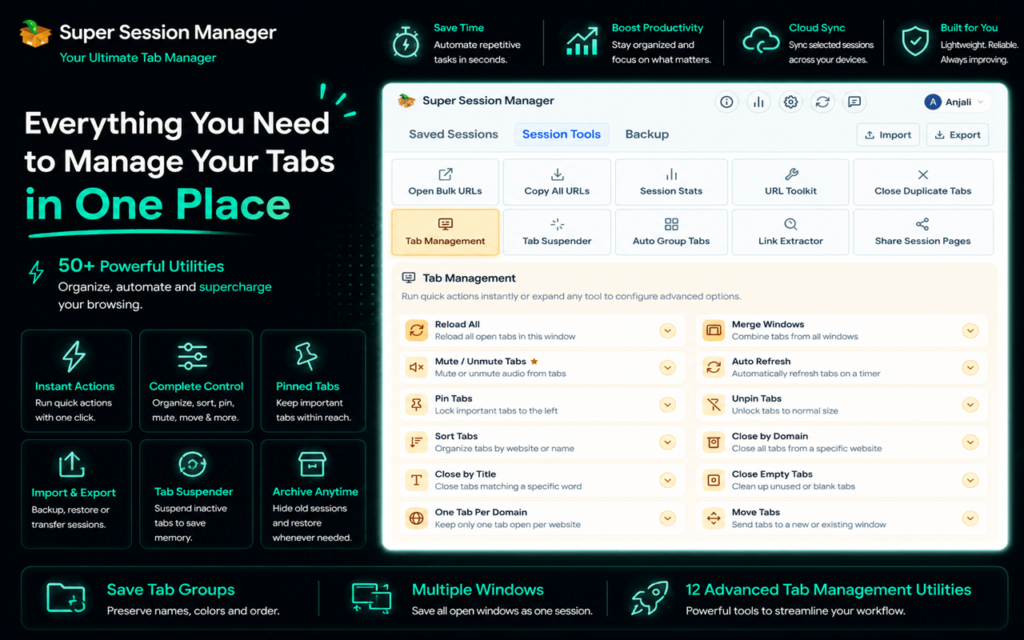
Super Session Manager includes a built-in Tab Suspender feature that helps reduce unnecessary resource consumption.
Inactive tabs can be placed into sleep mode while remaining available for future use.
Benefits include:
- Lower RAM usage
- Reduced CPU load
- Better browser performance
- More efficient multitasking
This allows developers to keep useful resources available without slowing down their system.
Keep Development Sessions Clean With Duplicate Detection.
Developers frequently open the same resources multiple times.
While researching a technical issue, it is easy to create duplicate tabs containing:
- Documentation pages
- GitHub issues
- Tutorials
- Reference materials
Over time, these duplicates make navigation harder.
Super Session Manager helps identify duplicate tabs and keeps browser sessions more organized.
A cleaner workspace means less time searching and more time building.
Cleaner URLs for Better Organization.
Technical resources often contain long URLs with tracking parameters.
When saving large numbers of pages, these unnecessary elements can make sessions difficult to read.
Super Session Manager includes URL cleaning features that remove unwanted tracking information.
This helps developers maintain cleaner saved sessions and makes exported sessions easier to understand.
For teams sharing research resources, cleaner links create a more professional workflow.
Backup and Migration for Developers.
Developers frequently change machines, reinstall systems, or move between environments.
Losing browser organization during these changes can be frustrating.
Super Session Manager provides import and export options that make session backup and migration easier.
Developers can:
- Export saved sessions
- Create backups
- Move workflows between devices
- Restore previous environments
This is particularly useful for developers managing multiple machines or long-term projects.
See also: Technology Reshaping the Way Financial Stakeholders Connect
Privacy Matters When Managing Browser Data.
Browser extensions often require access to open tabs and browsing information, making privacy an important consideration.
Super Session Manager follows a privacy focused approach with features designed around user control.
Important aspects include:
- Local-first storage
- Minimal permissions
- Secure session handling
- No unnecessary advertising systems
For developers working with private projects, client information, or internal resources, controlling browser data is important.
More Than Just a Browser Utility.
A modern developer workflow depends heavily on the browser.
Documentation, collaboration tools, cloud platforms, testing systems, and research all happen through browser windows.
Because of this, managing tabs is no longer a small convenience. It directly affects productivity.
A good tab manager should help developers maintain focus by reducing browser chaos without forcing them to close valuable resources.
Super Session Manager combines session saving, tab organization, memory management, backups, and privacy controls into one practical solution.
Final Thoughts.
Developers do not have a tab problem. They have a workflow management problem.
Every open tab represents information, research, or progress that matters.
Instead of constantly closing tabs, searching history, or rebuilding project environments, developers can use smarter session management to keep their work organized.
Super Session Manager provides a structured way to save browser sessions, restore tabs, reduce clutter, and maintain productive workflows.
For developers looking for an advanced tab manager that understands modern browser based work, it offers a practical solution for turning hundreds of open tabs into organized development environments.